Metaverse UX Design: Principles for Virtual Worlds
Presence, spatial affordances, wayfinding in three dimensions and interfaces built into the world, plus how to test what you have built.
Understanding What Makes Virtual Worlds Actually Work
A well-built metaverse experience feels like walking into a room whose layout explains itself: it is obvious where things are and how to touch them. A badly built one feels like a maze in the dark. Closing that gap is what metaverse UX design is for.
The Psychology of Immersion
A film washes over the viewer; a game asks for something back, and the metaverse works like the game. Design here depends on active participation and on presence, the sense of being in a space rather than looking at it.
Beyond Flashy Graphics: The Importance of Intuition
Visual fidelity is not the job. A photorealistic virtual museum is useless if a visitor cannot work out how to open a door or read a label. Effective design prioritizes intuitive interaction: environments that are natural to use regardless of the visitor's technical skill.
Spatial Computing: A New Design Paradigm
Metaverse UX design sits inside spatial computing, where people interact with a digital environment in three dimensions. Patterns built for flat screens often break there. A dense 2D menu that reads fine on a website becomes overwhelming in VR, where it is projected across the whole field of vision.
Managing Cognitive Load in 3D
Reading detailed text while moving through a complex environment is tiring. Designs have to manage cognitive load by presenting information in a form that is easy to process in 3D: spatial audio cues, hand gestures that map to obvious actions, and sparse visual interfaces.
Designing for Diverse Hardware
The metaverse is not only VR headsets. People reach it through AR glasses, phones and desktops, and the same experience has to hold up on all of them, across differences in screen size, input method and processing power. Roles that do this work are listed under metaverse jobs.
The Core Principles That Separate Great From Awful
Metaverse UX design is closer to architecture than to page layout. The virtual worlds people return to, such as VRChat and Horizon Worlds, tend to share a few principles.
Presence: Beyond Visual Fidelity
Presence comes from interaction, not resolution. Reaching for a virtual object and feeling a haptic pulse in the controller does more for the illusion than another texture pass. Spatial audio, where sound changes with the listener's position and orientation, does the same work. Together they give the brain enough consistent feedback to treat the space as solid.
Spatial Affordances: Design That Makes Sense
Spatial affordances are the way an object's form communicates its use in 3D. A virtual doorknob should look like a doorknob and turn like one, so nobody needs a tutorial to open the door. A door that instead opens by pressing a floating button contradicts the rule the rest of the world has been teaching.
Traditional vs. Metaverse UX Design Principles
A comparison of how core UX principles translate from 2D to 3D immersive environments
| Design Principle | Traditional UX | Metaverse UX | Key Differences |
|---|---|---|---|
| User Research | Surveys, A/B testing, user interviews | VR usability testing, behavioral analytics in virtual environments, physiological data analysis | Shift from observing screen interactions to analyzing user behavior and responses within a 3D space. |
| Information Architecture | Linear navigation flows, menu structures | 3D spatial organization, environmental cues, wayfinding | Transition from hierarchical structures to spatial relationships and exploration. |
| Interaction Design | Mouse clicks, keyboard inputs, touchscreens | Hand tracking, gesture recognition, voice commands, haptic feedback | Move towards natural, embodied interactions that mimic real-world actions. |
| Visual Design | 2D graphics, UI elements | 3D models, environments, avatars, immersive visuals | Focus on creating a sense of presence and spatial awareness through realistic or stylized 3D graphics. |
| Usability Testing | Observing user interactions with a screen | Analyzing user behavior and comfort within a simulated VR environment | Shift from observing screen-based interactions to assessing physical comfort and natural movement in 3D space. |
The common thread is a move from designing what happens on a screen to designing what happens around a body.
Interface Integration: Part of the World, Not On Top of It
Interfaces should belong to the world rather than float above it. Checking the time by glancing at a virtual watch is a diegetic interface: the control exists as an object in the scene, so reading it costs nothing. Horizon Worlds applies the same idea with hand tracking for object manipulation, where the hand is the cursor.
Designing Virtual Spaces Where People Actually Connect
Social metaverse projects tend to over-invest in fidelity: sharper avatars, cleaner voice chat. The harder problem is human connection, and what carries over from physical spaces is social dynamics rather than resolution.
The Power of Proximity and Shared Experiences
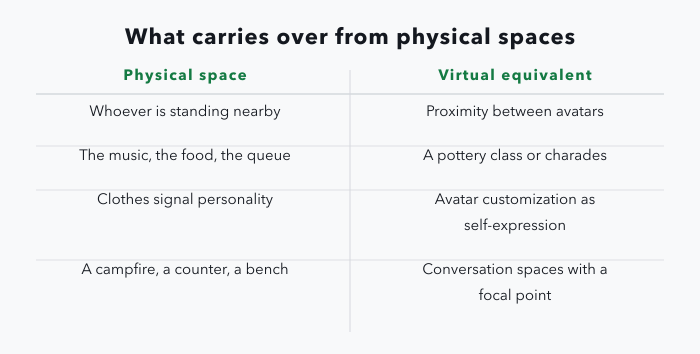
People at a party gravitate toward whoever is standing nearby, and conversations start from a shared thing: the music, the food, the queue. Platforms such as Rec Room build on proximity and shared activities for the same reason. A virtual pottery class or a game of charades gives strangers a reason to speak.
Avatar Customization: More Than Just Aesthetics
Customization is self-expression, not decoration. Clothes signal personality in the physical world, and avatars do the same job in a virtual one. Deep customization lets people present an identity they recognize, which makes the space feel like somewhere they belong.
Designing for Authentic Interaction
Conversation needs somewhere to happen. A campfire, a coffee shop counter, a park bench: conversation spaces with a focal point and a comfortable number of places to stand produce spontaneous talk in a way an open plain does not. Object placement, ambient sound and lighting all feed into whether a space invites people to stop.
Balancing Privacy and Openness: A Delicate Act
Social platforms have to hold privacy and openness together. People want to meet others and to stay in control of who can reach them. The equivalents of privacy settings, blocking and friend lists belong in virtual spaces too. Authority over who can approach an avatar, and over what that avatar reveals, is what makes an open space usable.
Mastering Movement And Wayfinding In Three Dimensions
Getting lost frustrates people quickly, so wayfinding has to be built into the environment rather than bolted on as a map. The job resembles urban planning for a city where residents can teleport, fly and pass through walls.
Spatial Memory in Virtual Worlds
Spatial memory forms differently in virtual reality. In physical space the brain anchors on buildings, trees and the horizon. Those anchors are often absent in a virtual world, or they move. Without a stable horizon or consistent landmarks, people lose their bearings within a few turns.
Rethinking Traditional Navigation
2D navigation patterns do not transfer. A dropdown menu is awkward in VR, and a linear click-through sequence means little where movement is possible in any direction. Clutter is also worse in 3D than on a page, because it surrounds the viewer: wayfinding information has to be sparse and placed in the world itself.
Practical Approaches to Wayfinding
Distinct landmarks, clear visual cues and a legible spatial hierarchy do most of the work. A tall clock tower is visible from anywhere in a virtual city. Color-coded paths indicate direction without text. Districts with their own character let people build a mental map of the whole.
Movement Mechanics: Teleportation and Flight
Teleportation should show the destination before the jump, so arrival is not disorienting. Flight needs a speed limit and clear motion feedback; fast movement across a wide field of view is a common cause of nausea.
Designing Expansive Yet Manageable Environments
Large environments overwhelm people. Dividing them into smaller connected zones, each with its own character and points of interest, makes them easier to navigate and cheaper to render.
Building Interfaces That Live In Virtual Space
Floating menus and 2D panels carried over from the browser sit badly in an immersive world. Interfaces need to read as part of the environment, which changes both how objects are handled and how information is shown.
Spatial UI: Designing for 3D Interaction
Spatial UI design builds on natural hand movement: grabbing an object, turning a dial. Hand tracking is the usual route, and it is imperfect. Recognition drops out and gestures get misread, so interactions need forgiving tolerances and a fallback input rather than precision the tracking cannot deliver.
Voice Commands That Understand Context
Voice control works when it is context-aware. The system has to register not only what was said but where the speaker is and what they are looking at. "Open this" while facing a door should open that door, not a menu.
Balancing Information Density and Spatial Awareness
Too much on screen breaks immersion; too little leaves people unsure what to do. Displays that appear when needed and disappear afterwards, and audio cues that guide without interrupting, keep the view clear while the information stays available.
Feedback Systems in Three Dimensions
Feedback can go beyond the visual. A haptic pulse when a virtual button is pressed confirms the action in the hand that performed it. Multi-sensory feedback through haptics, spatial audio and small changes in the environment registers faster than a notification panel. Design roles building this work are listed under design jobs.
Metaverse Interface Design Best Practices
Essential guidelines for creating effective interfaces in immersive 3D environments
| Interface Element | Traditional Approach | Metaverse Solution | User Benefit |
|---|---|---|---|
| Object Manipulation | Mouse clicks, keyboard controls | Direct hand interaction, gesture recognition | More intuitive and natural interaction |
| Navigation | 2D menus, point-and-click | Teleportation, embodied movement, hand-directed navigation | Increased sense of presence and agency |
| Information Display | Static screens, pop-up windows | Diegetic displays integrated into the environment, spatial audio cues | Reduced cognitive load, enhanced immersion |
| System Feedback | Visual notifications | Haptic feedback, spatialized audio cues | More engaging and informative feedback |
| Platform Compatibility | Designed for specific devices | Adaptive interfaces that adjust to different devices | Wider accessibility and consistent experience |
Adapting Across Platforms
Because people arrive on headsets, AR glasses, phones and desktops, interfaces have to be adaptive while keeping the experience recognizable across all of them. The variables are screen size, input method — hand tracking, controllers, touch — and available processing power.
Creating Trust In Spaces Where Anything Feels Possible
Trust carries more weight when people cannot physically verify their surroundings, so safety and transparency are design problems here, not policy afterthoughts.
Transparency Without Overwhelm
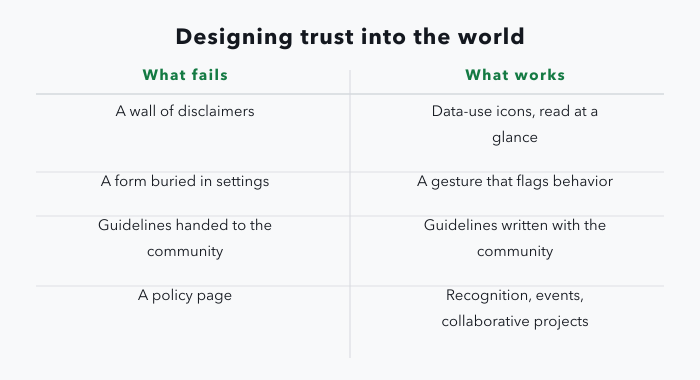
Someone walking into a virtual store wants to know what happens to their data, and a wall of disclaimers destroys the experience that brought them in. Icons that communicate data use at a glance, and short interactive explanations of privacy settings, carry the same information without stopping everything.
Effective Reporting and Moderation
Like any online community, a virtual world needs a way to deal with people who disrupt it. Reporting tools have to be findable and usable mid-experience — a gesture that flags behavior and notifies moderators, rather than a form buried in a settings menu.
Moderation also has to fit the culture of the community it governs, which means balancing enforcement against room to grow. Guidelines written with the community, rather than handed to it, produce a shared sense of responsibility.
Onboarding for Confidence, Not Anxiety
A confusing first ten minutes makes people anxious about interacting at all. Onboarding should build confidence instead: a guided tour that points out key features and introduces the social norms of the space. Letting people set up an avatar and adjust their surroundings early gives them a sense of control from the start.
Building Trust Through Community
Trust grows inside the community as well as from the platform. In-world recognition for positive contributions, visible user-generated work, community events and collaborative projects all give people a stake in the place. That participation does more for long-term engagement than any policy page.
Testing and Improving Your Virtual World
Usability testing in the metaverse is harder than on a page. A sense of presence, physical comfort while navigating a 3D space, and the ease of handling a virtual object are not things a click map records.
Adapting Usability Testing for Virtual Environments
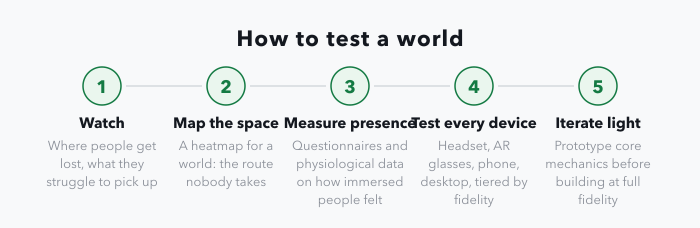
Screen-based testing observes what someone does with a cursor. Immersive testing has to capture behavior and comfort in a simulated 3D world: where a person gets lost in a virtual store, which products they struggle to pick up, where they stop and turn around. Physiological measures such as heart rate and eye tracking add a read on stress and attention that observation alone misses.
Innovative Methods for Immersive Experiences
Spatial behavior tracking works like a heatmap for a world, showing where people spend time, what holds their attention and how they move between areas. It surfaces problems that interviews do not, such as a route nobody takes or a corner nobody finds. Presence measurement, through questionnaires and physiological data, indicates how deeply immersed people felt, which helps separate the design elements that support that feeling from the ones that break it. Sourced figures on how metaverse platforms have actually performed are collected on the metaverse statistics page.
Testing Across Devices: The Compatibility Challenge
A world reached through headsets, AR glasses, phones and desktops has to be tested on all of them. One workable answer is a tiered experience, where complexity and visual fidelity scale to the device: a simplified version on a phone, the full version in VR, with the same core actions available in both.
Measuring Success Beyond Clicks and Time-on-Page
Clicks and time on page describe a web page, not a world. More useful measures are social: how often people interact with each other, how long those interactions run, whether they return to a space or pass through it once. Emotional engagement can be approached through physiological data or sentiment analysis of what people say in-world, though both are indirect and should be read as signals rather than verdicts.
Iterating Quickly in Resource-Intensive Environments
3D development is expensive, which makes rapid iteration hard. Lightweight prototyping to test core mechanics before anything is built at full fidelity keeps the cost of being wrong low. Modular design has the same effect later: individual pieces can be replaced without rebuilding the environment around them.
Design roles at Web3 and metaverse companies are listed on the job board, with median pay by role on the salaries page.